
How to Use Meme Sounds
In this short guide, we will show you how to use our meme soundboard and find the right sound for your video.
How to find a sound
There are four quick ways to find what you need:
- Search. Type at least three letters in the search box, for example "bruh" or "ding", and you'll see matching sounds right away.
- Categories. Browse sounds grouped by type, such as sound effects or meme audio, if you only know the kind of sound you want.
- Tags. Open a tag to see every sound that shares it, which is handy when you want something similar to a sound you already like.
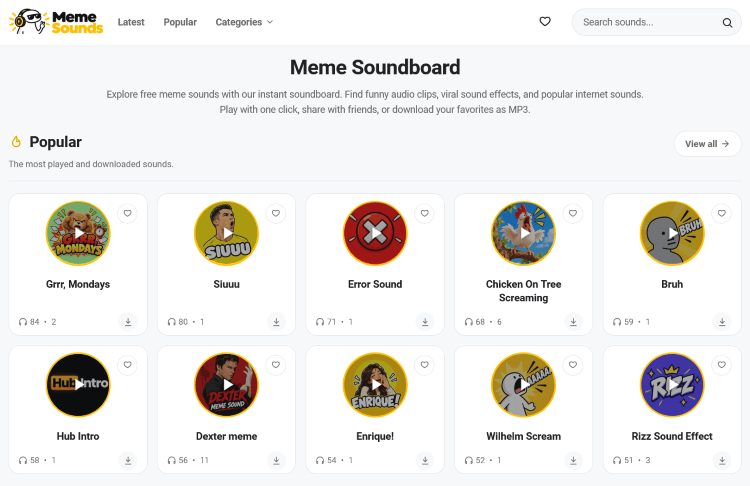
- Latest and Popular. Check the latest meme sounds to see what was just added, or the most popular meme sounds to see what other people are using.
Play and download
Tap the round button on any sound to hear it. Most meme sounds last only a few seconds, so you can try several in a minute.
When you find the right one, click its name or the small download icon at the bottom right of the card. This opens the sound's own page, where you'll see a yellow Download button. Press it to download the MP3 to your device. That page also shows related sounds, so it's a quick way to find similar ones.
Save your favorites
If you keep coming back to the same few sounds, add them to your favorites. Click the small heart icon in the top right corner of any sound card, or the heart button on the sound's own page. The heart turns red when the sound is saved, and you can click it again to remove it.
To see everything you saved, click the heart icon in the header at the top of the page. The small red number on it shows how many sounds you have saved. A window opens with all your favorites, so you can play them right there without searching again, and a button lets you clear the list.
Your favorites are stored in your browser, so you don't need an account. They stay on the device and browser you used to save them. If you clear your browser data or switch to another device, the list will be empty.
Using meme sounds in your videos
Once you've downloaded a sound, add it to your video in any editor, such as CapCut, InShot or Premiere Pro. A few simple tips:
- Keep it short. A good meme sound lands in a second or two.
- Time it to the cut. Place the sound exactly where the joke or reaction happens.
- Lower the volume of your background music for a moment so the sound stands out.
- Don't overdo it. One well-placed sound is funnier than five in a row.
Where to start
Not sure what to try first? Pick a category and play a few sounds:
- Memes for viral clips, reactions and famous internet moments.
- Sound effects for short effects like dings, booms and beeps.
New sounds are added regularly, so come back to Meme Sounds whenever you need the perfect audio for your next video.